Saturday, June 7, 2014

A look inside one of my flipped chemistry classroom


Here is the approach I take in my second year thermodynamics course.

The "lecture"
* I meet with the students twice a week for 90 minutes (plus a 15 min break in the middle).

* The very first time we meet, I lecture for 5-10 minutes, then ask a question on which we vote using Socrative, and repeat.

* Before every meeting after that the students must watch 4-6 video lectures, each 5-10 minutes long. Each video concludes with a multiple choice question with answer, i.e. immediate feedback.

* The videos are based on Powerpoint slides that the students have access to while they watch the video.

* Before every meeting after that the students must answer a multiple choice quiz with a question for each video.  The questions are relatively easy to answer (often T/F) for someone who has watched the video.  The students get immediate feedback on the answer to each question.

* The deadline for the quiz is midnight before the meeting.  The quiz is mandatory, though the repercussions for not taking it is left vague.  The U. Copenhagen course site has a nice feature where I can selectively send email to students who haven't taken the quiz yet.  If I remember, I do this around 8 pm. The quizzes do no contribute to the grade, which allows me to give immediate feedback.

* During the our meetings I use the peer instruction approach, where I ask about 10 multiple choice and 2 short answer questions using Socrative.  Roughly half the questions cover material from previous weeks and new material, respectively.  The questions tend to be conceptual questions that facilitate discussion.

* The students get the Powerpoint slides with the questions (but not the answers) after our meeting.

* The Powerpoint slides and videos replace the textbook for the course.

The homework
* Teams of up to 30 students meets with a TA for a 4 hour session every week where they can get help with the homework.  If possible I show up for an hour or so for each session to get a feel what students are struggling with.  How else will you know?

* Each week I present them with about 10 homework problems, of which they have to solve a minimum of about six. The first six are relatively easy and should be doable by everyone who deserves to pass.  The last four are more challenging and one of them is typically an open ended question. The mere fact that the student chose a particular problem makes them invested in solving the problem.  In my experience most students attempt all 10.

* The answer to the question is provided as multiple choice using the PeerWise platform, i.e. the student is presented with 4 possible (often numerical) answers, where one is the correct one.  After the student chooses one answer they are presented with a detailed explanation of how the problem should be solved.  In some cases this takes the form of a video, but most often the solution was a screenshot from MAPLE.

* The homework does not contribute to the grade (which allows be to give immediate feedback). However, PeerWise uses points and badges as motivators, and I frequently highlight the number and kinds of earned badges on the course website.

How I designed the curriculum 
1. I started by writing the homework problems I really wanted them to be able to solve. They are encouraged to use MAPLE, so the problems can be quite mathematically involved.  Ideally they involve some application, experimental data, or simulation.  You can see them here.

2. Then I wrote the in-class questions related to the underlying concepts behind the homework problems. I also included some questions on estimating answers to questions that where similar to the homework questions.

3. Next I created the Powerpoint slides for the videos, containing the information they would need to do the homework.

4. Then I recorded the videos.

5. Finally, I wrote the quizzes.

Contrast this to the usual curriculum "design":

1. Find a textbook and select relevant chapters

2. Divide "number of chapters" by "number of lectures" to obtain content of each lecture

3. Hunt through problems in the back of chapters for homework problems, most of which are uninteresting "toy" problems written to illustrative some concept from the chapter.

Considerations that went in to the curriculum design
* "Relevance" is a great motivator. Write relevant homework problems and let them drive the curriculum. If something doesn't contribute to solving an problem, leave it out.

* Just in time instead of just in case.  Introduce new concepts and technique as you need them to solve a problem. "You'll need this for later" is not a good motivator in and of itself.  For example, spending a lot of time deriving an equation before you know how to use it is not very motivating.

* Cognitive load. You can handle no more than 7 new concepts at a time.  So, one new concept per video and no more than seven videos before each meeting. Yes, you'll have to reduce your curriculum to avoid drowning out the important stuff.

* Spaced learning. Things don't "stick" (committed to long term memory) until you have seen it 3-4 times over a period of weeks. Covering something once or repeating something several times in the same lecture doesn't work. This means you have to start the course with the most important concepts to you can repeat the most important stuff most often.  Yes, you'll have to reduce your curriculum since you have to cover many concept several times.


Considerations that went in to the choice of teaching style
* Active learning. Ultimately, you are teaching students skills not facts.  You only learn skills my actively doing something.  As you apply the skills often enough you will commit the relevant facts to long-term memory.

* Peer instruction.  Students have an easier time understanding explanations given by their peers than by you and students learn an awful lot by actively explaining things to their peers.

Formative assessment. Answering questions is a powerful learning techniques if you get immediate feedback. Problem solving and conceptual understanding are two different skills and both must be assessed.


This work is licensed under a Creative Commons Attribution 4.0

Wednesday, June 4, 2014

Using Socrative in university courses: practical aspects


What is Socrative?
Socrative is a free student response system (or "web-clicker") that allows you to collect answers from students using the web.  I use it in all my courses at the Department of Chemistry at the University of Copenhagen, which I teach using the peer instruction approach.

The two features I use in Socrative are "Multiple Choice" and "Short Answer".  The video above gives a short introduction on how to do this.

Getting started
* You just make a free account and you get a room number assigned.

* You can easily try it out in your office, as I show in the video, before using it in class

Is Socrative right for you?
* Socrative is limited to 50 responses (actually 60-70 in practice) but you can use it in larger courses because you just need representative feedback to help you decide whether to move on to a different topic or not. The top students tend to vote first and correctly, so if the first 40 votes are from top students you might get the wrong impression that the majority understands the question. However, since "top students" are a minority, most students vote in pairs and not everyone bothers to vote, you can certainly use Socrative in courses where 300 students show up to lecture.

* Students need to bring a laptop or smartphone to vote.  Since many students vote in pairs and you only need representative feedback this is rarely a problem.  At the beginning of each course I send out an email to students telling them to bring a laptop or smartphone and to make sure that it can connect to the campus WiFi.

* Your classroom needs to be equipped with WiFi that can handle the load. Network problems resulting from overload is frustrating to the students. Maybe check with your IT support on this first.

In class
* As I mention in the video, when I ask multiple choice questions I control Socrative from my iPhone using the Socrative Teacher App.

* I don't show the result of the vote. If it's near unanimous there is no point and if it's split it will bias the re-vote.

* When I ask short answer questions I control Socrative on my laptop that is hooked up to the projector, because I eventually want to project the results of the vote and discuss it.  This means I have to flip back and forth between Powerpoint (where the question is stated) and the browser with Socrative.

* While the students discuss and vote walk among them (don't just stand in front of the class) as much as your classroom allows.  This way they can ask you questions and you get a feel for how many students have answered, which is especially important for short answer where you can't follow the progress on your iPhone.

Pacing: better too fast than too slow
* The main complaint about in class voting I have had from students is that it is too slow.

* Multiple choice: When ca 2/3 of the class have voted tell them "one more minute", make your way to the front of the class, tell them "last chance", then stop the vote.

* Multiple choice: If most got the right answer, don't spend a lot of time on explaining the answer.  I usually ask who wants to explain what they have voted for.

* Short Answer: don't wait for everyone to type an answer. You just need 5-10 answers to vote one.

* Short Answer: go through the top 1-3 answers and point out any errors.  If you happen to spot something very wrong in the remaining answers point it out nicely and explain why it's wrong.

* On average I get through about five multiple choice questions and one short answer question in a 45 minute lecture period.

Alternatives to Socrative
There are several alternatives to Socrative such as Shakespeak, Polleverywhere, and Learning Catalytics.  All of these alternatives can be used to collect more than 50 votes but they are not free.

I use Socrative because it is free and easy to use.


This work is licensed under a Creative Commons Attribution 4.0
Saturday, May 17, 2014

Pre- and post-publication peer review: some new tools

There has been some interesting developments in peer review lately:

Altmetric it is a bookmarklet you install in your browser.  Once installed go to any recent publication on the journal web page and click on the bookmarklet to get altmetric data (once you have installed it try this computational chemistry paper as an example).  Most importantly you get links to twitter comments and blog posts (I hear Google+ and PubPeer integration is on the way) where a lot of post-publication peer review happens.

I think this is the future of post-publication peer review: don't worry about where it happens, just make sure it can be easily found.

PubPeer is discussion forum centered around journal articles and preprints (click here for a computational chemistry example). These discussion fora are notoriously difficult to get off the ground so I am impressed how much discussion is already going on there.  PubPeer has recently made an extension that adds links to PubPeer comments on Pubmed search results and journal websites.

PeerLibrary allows you to create and share annotated versions of papers.  If you think about it, the most common form of post-publication peer review is the highlighting of text and margin notes we all make when we read a paper.  PeerLibrary allows you to share this.

I do most of my annotations using iAnnotate on my iPad and uploading pre-annotated pdf files does not seem to work for all pages, so I am not sure how much I will use this service yet.  Also, the text in the uploaded files are currently quite grainy. But I like the general idea very much and I'll probably use it more if/when these things get fixed. Anyway, you can see what I have messed around with so far here.

Publons is a site for listing, and getting credit for, the reviews you do.  This appeals greatly to me since usually review anonymously. I have just has a brief look at it (you can see my profile here) but I think my workflow will be the following:

(1) Prepare (e.g. paste in) the review and de-select "Has this article been published?".  This will just list the article title and journal.  As the site states "We can not publish the content of your review until the article has been published, as this would be unfair to the author if they decided to resubmit the article."

(2) Once the article is published, you can make the actual review visible.  It would be nice if Publons could keep track of this (using the info you provided) and alert you.

You can also review papers already published (in which case it's a bit like PubPeer) and you can also review anonymously.


Have I missed some cool reviewing tools?  If so, leave a comment.


This work is licensed under a Creative Commons Attribution 4.0

Notes from Michael Staton's talk at EduDisrupt


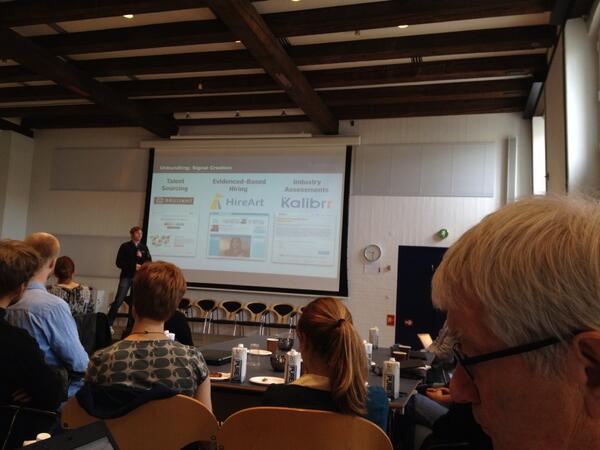
Last Wednesday I attended the morning session of the EduDisrupt meeting in Copenhagen.  The talk that interested me most was by venture capitalist Michael Staton, a former history teacher (some things he has written here and here).  Towards the end of the talk he flashed up four slides with companies he has invested in and some of them sounded pretty interesting.  I managed to take picture of the last 3 so I could look them up later, which is what I am doing now.

Slide 1

I am pretty sure Udemy and Edmodo was on it.

Slide 2 (shown above)

Talent sourcing: Brilliant

Evidenced hiring: HireArt

Industry assessment: Kalibrr

Slide 3

Peer motivation: NovoEd

Coached curriculum: Bloc

Expert guidance: popexpert

Slide 4

Distributed schooling:

AltSchool

mSchool

General Assembly

Gap year

Can we, teachers or universities, provide similar services or use similar tools to identify, help, retain, and promote students?


This work is licensed under a Creative Commons Attribution 4.0
Tuesday, May 6, 2014

Protease variants paper is out

Our methodology to find in a stochastic way variants for HIV-1 protease is finally published! You can read it and download it through this link.

The residues located by our methodology as the most apt to be changed, so as to bind better the new peptide substrate. Check out the paper to learn more.

The work behind this paper has been long and painful, but hopefully worth it. But that's no news, most papers are born that way.
The algorithm we used is based on PyRosetta, a Python interpreter to Rosetta. Structures were further evaluated with FMO single points at the MP2 level of theory, which accounts for a big part of the spent time.

Saturday, April 12, 2014

Kids today and the good old days when lectures worked

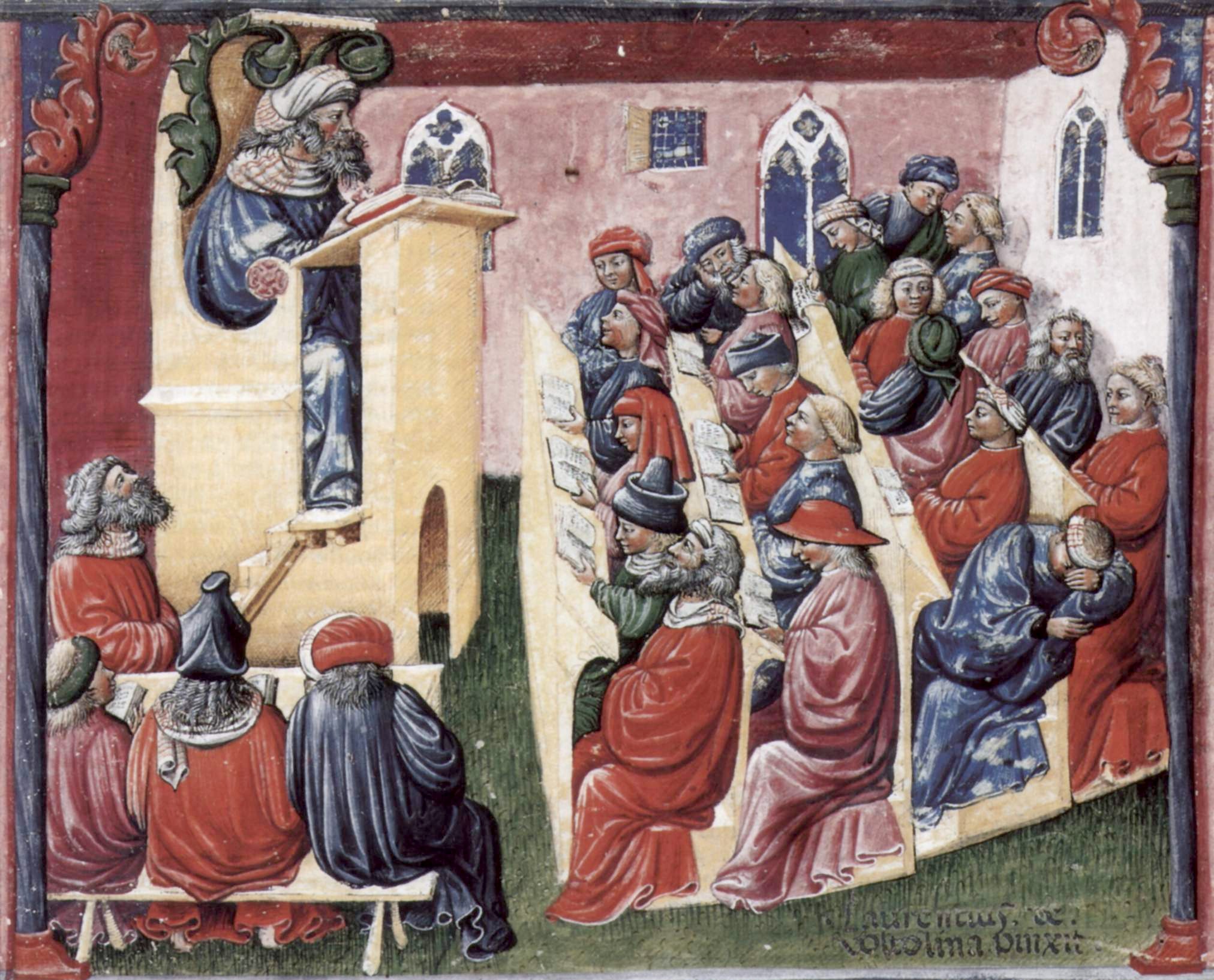
A lecture boring students 600 years ago source

A few days ago the flipped classroom concept made the front page of the major Danish newspaper Politiken.  The occasion was the appointment of a new president of Roskilde University, Hanne Leth Andersen, a professor of education. Among other things, the interview motivated the use of the flipped classroom approach by arguing that incoming students have changed  in recent years and that they loose patience with hour-long lectures. 

Having given interviews myself, I know it's hard to separate what Leth Andersen actually said and how it is presented in the article, so I think the article is being unfair to students in that respect. Lectures never really worked well and we have known that for a long time.

Perhaps the most celebrated lectures in the natural sciences are the Feynman Lectures on Physics, which he gave to Caltech students more than 50 years ago. Here is what Feynman wrote in the preface to the lecture notes in 1963 (emphasis mine): 
The question, of course, is how well this experiment has succeeded. My own point of view—which, however, does not seem to be shared by most of the people who worked with the students—is pessimistic. I don't think I did very well by the students. When I look at the way the majority of the students handled the problems on the examinations, I think that the system is a failure
I think, however, that there isn't any solution to this problem of education other than to realize that the best teaching can be done only when there is a direct individual relationship between a student and a good teacher—a situation in which the student discusses the ideas, thinks about the things, and talks about the things. It's impossible to learn very much by simply sitting in a lecture, or even by simply doing problems that are assigned. 
One of the most common components of the flipped classroom approach is peer instruction, pioneered by Eric Mazur at Harvard University, in which lecture is replaced by in-class discussion and voting using clickers. Mazur switched to this approach in the early 1990's because he found that lecturing lead to rote-memorization and little conceptual understanding among his elite Harvard pre-med students.  He was lead to this realization by a series of papers published in 1985 by David Hestenes that demonstrated this general trend based on test results from ca 1000 students taught by 7 different instructors at two different universities in the early 1980's.


Carl Wieman related this story from another pioneer in science education, Joe Redish, who came to the same realization in the late 1970's:
Even though the students thought his lectures were wonderful, Joe wondered how much they were actually learning. So he hired a graduate student to grab students at random as they filed out of class at the end of the lecture and ask, “What was the lecture you just heard about?” It turned out that the students could respond with only with the vaguest of generalities.
I'm not saying students haven't changed. And the way we teach students need to change. But in the case of "the lecture" as the primary teaching tool, these two things are largely unrelated.


This work is licensed under a Creative Commons Attribution 4.0

Friday, April 4, 2014

New manuscript: A third-generation dispersion and third-generation hydrogen bonding corrected PM6 method: PM6-D3H+


After a long fight, I can finally say that I've submitted the method I've been working on. PM6-D3H+. Well, the method is actually 'stolen' pieces from other great work, implemented in GAMESS.

The MS is submitted to +PeerJ and is therefore also available on preprint:
https://peerj.com/preprints/353v1

Abstract:
We present new dispersion and hydrogen bond corrections to the PM6 method, PM6-D3H+, and its implementation in the GAMESS program. The method combines the DFT-D3 dispersion correction by Grimme et al with a modified version of the H+ hydrogen bond correction by Korth. Overall, the interaction energy of PM6-D3H+ is very similar to PM6-DH2 and PM6-DH+, with RMSD and MAD values within 0.02 kcal/mol of one another. The main difference is that the geometry optimizations of 88 complexes result in 82, 6, 0, and 0 geometries with 0, 1, 2, and $\ge$ 3 imaginary frequencies using PM6-D3H+ implemented in GAMESS, while the corresponding numbers for PM6-DH+ implemented in MOPAC are 54, 17, 15, and 2. The PM6-D3H+ method as implemented in GAMESS offers an attractive alternative to PM6-DH+ in MOPAC in cases where the LBFGS optimizer must be used and a vibrational analysis is needed, e.g. when computing vibrational free energies. While the GAMESS implementation is up to 10 times slower for geometry optimizations of proteins in bulk solvent, compared to MOPAC, it is sufficiently fast to make geometry optimizations of small proteins practically feasible.

The method is implemented in GAMESS, and will be available to public as soon as possible.